
Bill Customer for Usage
Overview
This guide shows you how to implement Update subscription Item endpoint to charge your customers based on how much of your service they use.
Use Case
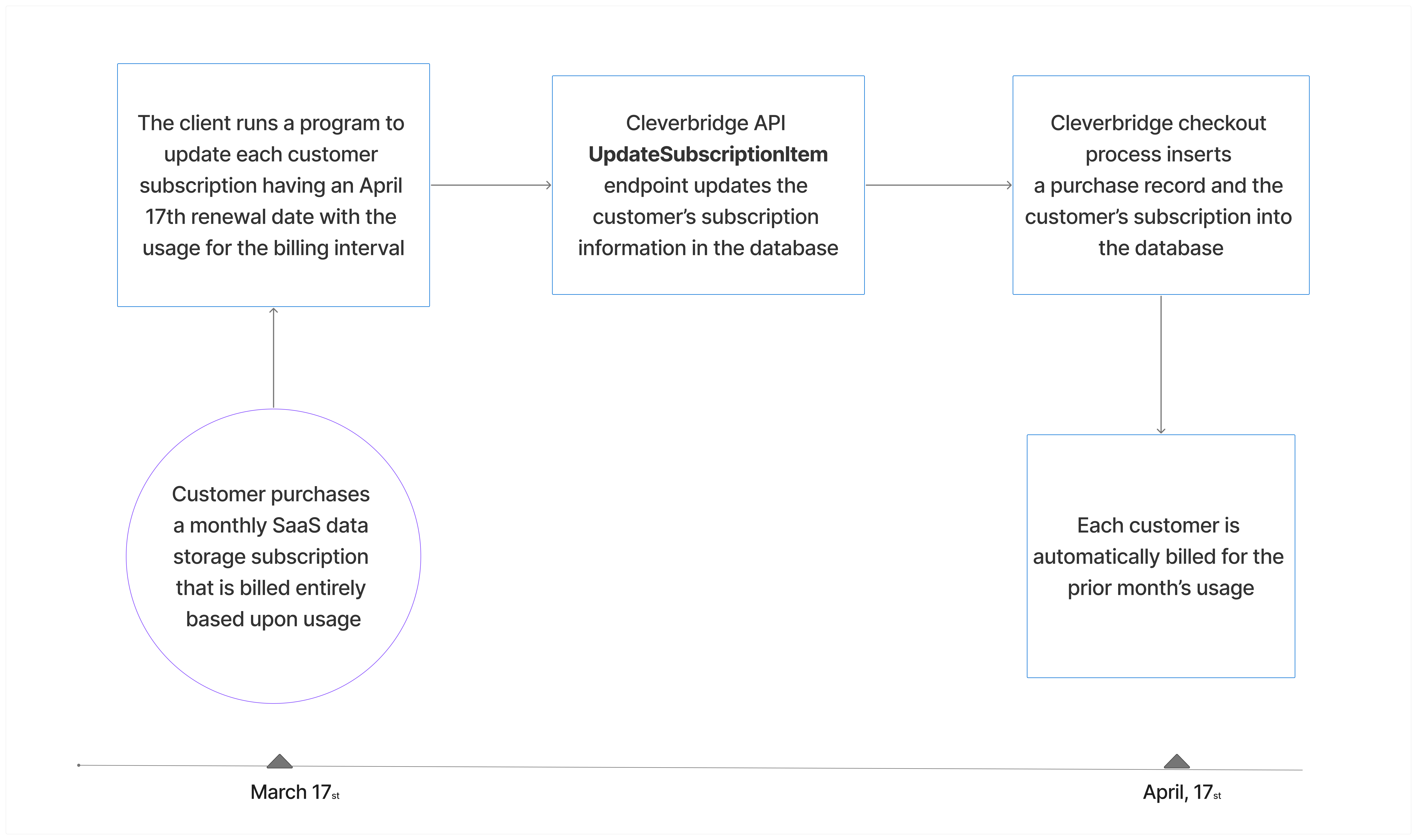
- On March 17th, a customer purchases a SaaS data storage subscription that is billed monthly. This service is priced entirely upon the amount of data storage used each month using a formula that your organization applies to activity records within its data centers. Although the customer was required to enter payment information to complete the purchase, the customer is not billed at this time.
- At the end of the day on April 16th, you use a program that accesses the Update Subscription Item endpoint to update the usage quantity for the monthly billing interval that just ended. This program calculates usage for each subscription with a renewal date of April 17th.
- On April 17th, the Cleverbridge platform automatically bills each customer for the prior month's usage.
- Every subsequent month, you run the program to update subscriptions with usage information.
Implement Update Subscription Item endpoint
Make sure that:
- The subscription has the status Active.
- You know the next reminder date for the subscription because the subscription must be updated with the usage information before this date.
- The new purchase is created in the Cleverbridge platform on the next reminder date.
- In order to be billed, the usage information must have been applied to the subscription record in the Cleverbridge system.
ImportantGet the customer's consent for changes to subscriptions. To avoid chargebacks and customer inquiries, it is also essential that you coordinate all price increases with Client Experience.
In the European Economic Area (EEA), Strong Customer Authentication (SCA) is required for recurring electronic payments when the amount changes. This means that some of your customers will have to authenticate their payment, which in turn might impact the renewal success rate.
For more information, see Best Practices: Obtain Customer Consent.
Parameters
Set the parameters in the Update Subscription Item API endpoint to the values listed in the table.
Parameter | Type | Required | Example |
|---|---|---|---|
AlignmentSettings | obj | No | `AlignToCurrentInterval: false GetCustomerPricePreviewOnly: false` |
ProductId | int | Yes | 29899 |
RunningNumber | int | Yes | 1 |
Quantity | int | Yes | 1 |
SubscriptionId | str | Yes | S12345678 |
UpdateAction | str | No | upgrade. |
- Use of the
CustomerPriceparameter in the API response is optional if you're using the Update Subscription Item API endpoint and required if you're using the Update Subscription Item Price endpoint. Before doing so, see Get Started with Subscriptions > Understand Customer Price. - Use the
AlignmentSettingsparameter for the subscription in the API response is required. Before doing so, see Get Started with Subscriptions > Alignment Settings.
NoteThe
UpdateActionparameter is currently used for documentation and tracking only. The value set does not affect transaction processing.The supported values are as follows:
- For upgrades, set the parameter to
upgrade(or 1 for JSON)- For downgrades, set the parameter to
downgrade, (or 2 for JSON)- For all other changes, set the parameter to
update(or 0 for JSON)
Request
curl --location --request POST 'https://rest.cleverbridge.com/subscription/updatesubscriptionitem' \
--header 'Content-Type: application/json' \
--header 'Accept: application/json' \
--header 'Authorization: Basic YOUR_BASE64_ENCODED_CREDENTIALS' \
--data '{
  "SubscriptionId": "S12345678",
  "ProductId": 29899,
  "Quantity": 1,
  "RunningNumber": 1,
  "UpdateAction": "upgrade",
  "AlignmentSettings": {
    "AlignToCurrentInterval": false,
    "GetCustomerPricePreviewOnly": false
  },
  "CustomerPrice": {
    "CurrencyId": "EUR",
    "IsGross": true,
    "Value": 9.99
  }
}'
import requests

url = "https://rest.cleverbridge.com/subscription/updatesubscriptionitem"

headers = {
    "Content-Type": "application/json",
    "Accept": "application/json",
    "Authorization": "Basic YOUR_BASE64_ENCODED_CREDENTIALS",
}

payload = {
    "SubscriptionId": "S12345678",
    "ProductId": 29899,
    "Quantity": 1,
    "RunningNumber": 1,
    "UpdateAction": "upgrade",  # depending on setup, some integrations may use numeric codes
    "AlignmentSettings": {
        "AlignToCurrentInterval": False,
        "GetCustomerPricePreviewOnly": False,
    },
    "CustomerPrice": {
        "CurrencyId": "EUR",
        "IsGross": True,
        "Value": 9.99,
    },
}

response = requests.post(url, json=payload, headers=headers)

print("Status code:", response.status_code)
print("Response body:", response.text)
const axios = require("axios");

const url = "https://rest.cleverbridge.com/subscription/updatesubscriptionitem";

const headers = {
  "Content-Type": "application/json",
  Accept: "application/json",
  Authorization: "Basic YOUR_BASE64_ENCODED_CREDENTIALS",
};

const data = {
  SubscriptionId: "S12345678",
  ProductId: 29899,
  Quantity: 1,
  RunningNumber: 1,
  UpdateAction: "upgrade", // sometimes represented as 1 in JSON mappings
  AlignmentSettings: {
    AlignToCurrentInterval: false,
    GetCustomerPricePreviewOnly: false,
  },
  CustomerPrice: {
    CurrencyId: "EUR",
    IsGross: true,
    Value: 9.99,
  },
};

axios
  .post(url, data, { headers })
  .then((res) => {
    console.log("Status:", res.status);
    console.log("Response:", res.data);
  })
  .catch((err) => {
    console.error(
      "Error:",
      err.response ? err.response.status + " " + JSON.stringify(err.response.data) : err.message
    );
  });
import java.net.URI;
import java.net.http.HttpClient;
import java.net.http.HttpRequest;
import java.net.http.HttpResponse;

public class UpdateSubscriptionItemExample {
    public static void main(String[] args) throws Exception {
        String url = "https://rest.cleverbridge.com/subscription/updatesubscriptionitem";

        String jsonBody = """
        {
          "SubscriptionId": "S12345678",
          "ProductId": 29899,
          "Quantity": 1,
          "RunningNumber": 1,
          "UpdateAction": "upgrade",
          "AlignmentSettings": {
            "AlignToCurrentInterval": false,
            "GetCustomerPricePreviewOnly": false
          },
          "CustomerPrice": {
            "CurrencyId": "EUR",
            "IsGross": true,
            "Value": 9.99
          }
        }
        """;

        HttpClient client = HttpClient.newHttpClient();

        HttpRequest request = HttpRequest.newBuilder()
                .uri(URI.create(url))
                .header("Content-Type", "application/json")
                .header("Accept", "application/json")
                .header("Authorization", "Basic YOUR_BASE64_ENCODED_CREDENTIALS")
                .POST(HttpRequest.BodyPublishers.ofString(jsonBody))
                .build();

        HttpResponse<String> response =
                client.send(request, HttpResponse.BodyHandlers.ofString());

        System.out.println("Status code: " + response.statusCode());
        System.out.println("Response body: " + response.body());
    }
}
Response
{
  "Status": "Success",
  "Message": "Subscription item updated successfully.",
  "SubscriptionId": "284947",
  "UpdatedItem": {
    "ProductId": 29899,
    "RunningNumber": 1,
    "Quantity": 1,
    "UpdateAction": "upgrade",
    "AlignmentSettings": {
      "AlignToCurrentInterval": false,
      "GetCustomerPricePreviewOnly": false
    },
    "CustomerPrice": {
      "CurrencyId": "EUR",
      "IsGross": true,
      "Value": 9.99
    }
  },
  "PriceImpact": {
    "OldRecurringAmount": {
      "Value": 5.99,
      "CurrencyId": "EUR",
NoteThe Cleverbridge platform generates an email for new purchases that cannot be suppressed.
Diagram
Updated 25 days ago