

Track Performance of a Promotional Campaign for Subscription Customers
Overview
This guide shows you how to use the Update Subscription Parameters, Update Next Billing Date, and Reinstate Subscription Items endpoints to track the performance of a subscription reactivation campaign.
Use case
Cloudify offers a monthly subscription service. To win back former customers, Cloudify emails former subscribers and offers a 25% discount if they reactivate their subscriptions.
The email includes a promotion code (25off) that Cloudify stores as an x-parameter to track which reactivations originated from the campaign.
When a customer accepts the offer:
- Your application assigns the promotion identifier to the subscription.
- Your application updates the next billing date so billing can occur immediately.
- Your application reinstates the canceled subscription item.
Result
The selected subscription items are reactivated. The customer is billed on the updated billing date, and the promo x-parameter is copied to future subscription purchases for reporting and campaign analysis.
Implement API endpoints
Before you start
Make sure that:
- All subscription items have the status
Deactivated - Each subscription item being reinstated belongs to a currently available subscription product
- Changes to x-parameters only affect future billing intervals and do not modify historical data
- The new billing date is in the future. If you want billing to occur today, set the date at least one minute in the future
- You have obtained the customer's consent before making subscription changes
ImportantGet the customer's consent before making changes to a subscription.
To avoid chargebacks and customer inquiries, it is also essential that you coordinate all price increases with Client Experience.
In the European Economic Area (EEA), Strong Customer Authentication (SCA) is required for recurring electronic payments when the amount changes. This means that some of your customers will have to authenticate their payment, which in turn might impact the renewal success rate.
For more information, see Best Practices: Obtain Customer Consent.
Step 1: Apply the promotional discount
Update the subscription pricing so the customer receives the advertised 25% discount.
In our web admin tool, go to Manage > Subscriptions > Subscription ID . On the Subscription Details page, scroll down to the section below Subscription Items.
Select the X-Parameters tab, then review the X-parameters displayed in the table:
Key – The name of the X-parameter.
Value – The value assigned to the X-parameter.
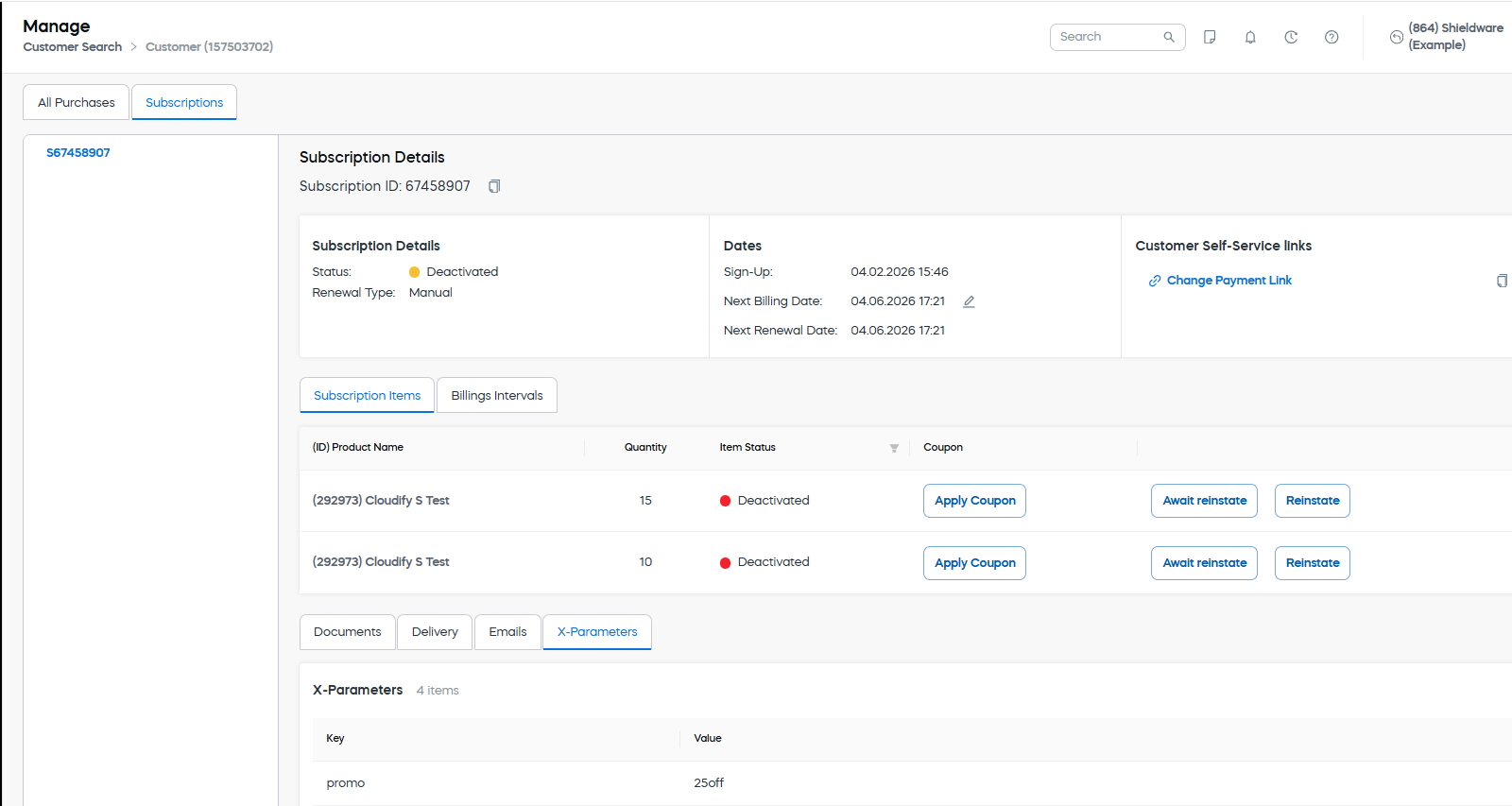
In the example shown, the subscription contains an X-parameter with the key promo and the value 25off
For more details, see Set up X-parameter.
Step 2: Assign the campaign identifier to the subscription
Use the Update Subscription Parameters endpoint to store the promotion identifier on the subscription.
Parameters
| Parameter | Type | Required | Example | Notes |
|---|---|---|---|---|
| SubscriptionId | str | Yes | 67458907 | Unique ID of the subscription, with or without an initial 'S'. |
| Items | array | Yes | { "Key": "promo", "Value": "25off" } | The x-parameter used to track the campaign. Cloudify stores the promotion identifier ( 25off) in the promo x-parameter. |
Request
curl --location 'https://rest.cleverbridge.com/subscription/updatesubscriptionparameters' \
--header 'Content-Type: application/json' \
--header 'Accept: application/json' \
--header 'Authorization: Basic YOUR_BASE64_ENCODED_CREDENTIALS' \
--data '{
    "SubscriptionId": "67458907",
    "Items": [
        {
            "Key": "promo",
            "Value": "25off"
        }
    ]
}'
import http.client
import json
conn = http.client.HTTPSConnection("rest.cleverbridge.com")
payload = json.dumps({
"SubscriptionId": "67458907",
"Items": [
{
"Key": "promo",
"Value": "25off"
}
]
})
headers = {
'Content-Type': 'application/json',
'Accept': 'application/json',
'Authorization': 'Basic YOUR_BASE64_ENCODED_CREDENTIALS'
}
conn.request("POST", "/subscription/updatesubscriptionparameters", payload, headers)
res = conn.getresponse()
data = res.read()
print(data.decode("utf-8"))var https = require('follow-redirects').https;
var fs = require('fs');
var options = {
'method': 'POST',
'hostname': 'rest.cleverbridge.com',
'path': '/subscription/updatesubscriptionparameters',
'headers': {
'Content-Type': 'application/json',
'Accept': 'application/json',
'Authorization': 'Basic YOUR_BASE64_ENCODED_CREDENTIALS'
},
'maxRedirects': 20
};
var req = https.request(options, function (res) {
var chunks = [];
res.on("data", function (chunk) {
chunks.push(chunk);
});
res.on("end", function (chunk) {
var body = Buffer.concat(chunks);
console.log(body.toString());
});
res.on("error", function (error) {
console.error(error);
});
});
var postData = JSON.stringify({
"SubscriptionId": "67458907",
"Items": [
{
"Key": "promo",
"Value": "25off"
}
]
});
req.write(postData);
req.end();Unirest.setTimeouts(0, 0);
HttpResponse<String> response = Unirest.post("https://rest.cleverbridge.com/subscription/updatesubscriptionparameters")
.header("Content-Type", "application/json")
.header("Accept", "application/json")
.header("Authorization", "Basic YOUR_BASE64_ENCODED_CREDENTIALS")
.body("{\n \"SubscriptionId\": \"67458907\",\n \"Items\": [\n {\n \"Key\": \"promo\",\n \"Value\": \"25off\"\n }\n ]\n}")
.asString();
{
    "SubscriptionId": "67458907",
    "Items": [
        {
            "Key": "promo",
            "Value": "25off"
        }
    ]
}
Response
{
    "ResultMessage": "OK"
}
Step 3: Update the next billing date
Use the Update Next Billing Date endpoint to set the next billing date to a few minutes in the future. This allows Cleverbridge to charge the customer immediately after the subscription is reactivated.
Parameters
| Parameter | Type | Required | Example | Notes |
|---|---|---|---|---|
| SubscriptionId | str | Yes | S67458907 | The unique identifier of the subscription. |
| NextBillingDate | datetime | Yes | 2026-01-06T12:01:00Z | Must be a future date and time. |
Request
curl --location 'https://rest.cleverbridge.com/subscription/updatenextbillingdate' \
--header 'Content-Type: application/json' \
--header 'Accept: application/json' \
--header 'Authorization: Basic YOUR_BASE64_ENCODED_CREDENTIALS' \
--data '{
    "SubscriptionId": "S67458907",
    "NextBillingDate": "2026-06-30T12:01:00Z"
}'
import http.client
import json
conn = http.client.HTTPSConnection("rest.cleverbridge.com")
payload = json.dumps({
"SubscriptionId": "S67458907",
"NextBillingDate": "2026-06-30T12:01:00Z"
})
headers = {
'Content-Type': 'application/json',
'Accept': 'application/json',
'Authorization': 'Basic YOUR_BASE64_ENCODED_CREDENTIALS'
}
conn.request("POST", "/subscription/updatenextbillingdate", payload, headers)
res = conn.getresponse()
data = res.read()
print(data.decode("utf-8"))var request = require('request');
var options = {
'method': 'POST',
'url': 'https://rest.cleverbridge.com/subscription/updatenextbillingdate',
'headers': {
'Content-Type': 'application/json',
'Accept': 'application/json',
'Authorization': 'Basic YOUR_BASE64_ENCODED_CREDENTIALS'
},
body: JSON.stringify({
"SubscriptionId": "S67458907",
"NextBillingDate": "2026-06-30T12:01:00Z"
})
};
request(options, function (error, response) {
if (error) throw new Error(error);
console.log(response.body);
});
Unirest.setTimeouts(0, 0);
HttpResponse<String> response = Unirest.post("https://rest.cleverbridge.com/subscription/updatenextbillingdate")
  .header("Content-Type", "application/json")
  .header("Accept", "application/json")
  .header("Authorization", "Basic YOUR_BASE64_ENCODED_CREDENTIALS")
  .body("{\n  \"SubscriptionId\": \"S67458907\",\n  \"NextBillingDate\": \"2026-06-30T12:01:00Z\"\n}")
  .asString();
Response
{
    "ResultMessage": "OK"
}
Step 4: Reinstate the subscription item
Use the Reinstate Subscription Items endpoint to reactivate the canceled subscription item.
Parameters
| Parameter | Type | Required | Example | Notes |
|---|---|---|---|---|
| SubscriptionId | str | Yes | S67458907 | The unique identifier of the subscription. |
| Items | array | Yes | [1] | Array of running numbers for the subscription items to reinstate. |
Request
curl --location 'https://rest.cleverbridge.com/subscription/reinstatesubscriptionitems' \
--header 'Content-Type: application/json' \
--header 'Accept: application/json' \
--header 'Authorization: Basic YOUR_BASE64_ENCODED_CREDENTIALS' \
--data '{
  "SubscriptionId": "S67458907",
  "Items": [
    1
  ]
}'
import http.client
import json
conn = http.client.HTTPSConnection("rest.cleverbridge.com")
payload = json.dumps({
"SubscriptionId": "S67458907",
"Items": [
1
]
})
headers = {
'Content-Type': 'application/json',
'Accept': 'application/json',
'Authorization': 'Basic YOUR_BASE64_ENCODED_CREDENTIALS'
}
conn.request("POST", "/subscription/reinstatesubscriptionitems", payload, headers)
res = conn.getresponse()
data = res.read()
print(data.decode("utf-8"))var https = require('follow-redirects').https;
var options = {
'method': 'POST',
'hostname': 'rest.cleverbridge.com',
'path': '/subscription/reinstatesubscriptionitems',
'headers': {
'Content-Type': 'application/json',
'Accept': 'application/json',
'Authorization': 'Basic YOUR_BASE64_ENCODED_CREDENTIALS'
},
'maxRedirects': 20
};
var req = https.request(options, function (res) {
var chunks = [];
res.on("data", function (chunk) {
chunks.push(chunk);
});
res.on("end", function (chunk) {
var body = Buffer.concat(chunks);
console.log(body.toString());
});
res.on("error", function (error) {
console.error(error);
});
});
var postData = JSON.stringify({
"SubscriptionId": "S67458907",
"Items": [
1
]
});
req.write(postData);
req.end();Unirest.setTimeouts(0, 0);
HttpResponse<String> response = Unirest.post("https://rest.cleverbridge.com/subscription/reinstatesubscriptionitems")
.header("Content-Type", "application/json")
.header("Accept", "application/json")
.header("Authorization", "Basic YOUR_BASE64_ENCODED_CREDENTIALS")
.body("{\n \"SubscriptionId\": \"S67458907\",\n \"Items\": [\n 1\n ]\n}")
.asString();
{
  "SubscriptionId": "S67458907",
  "Items": [
    1
  ]
}
Response
{
    "ResultMessage": "OK"
}
Result
The subscription item is reactivated, the customer is billed on the updated billing date, and the "Key": "promo", "Value": "25off" parameter is copied to future purchases for reporting and campaign analysis.
Diagram
flowchart LR
classDef mainColor fill:#ffffff,color:#555555,stroke:#96C34B,stroke-width:2px;
A([" <br/><b>Assign Campaign ID</b><br/>Assign the <i>promo=25off</i> x-parameter to the subscription. <br/> "]):::mainColor
--> B([" <br/><b>Update Billing Date</b><br/>Set the next billing date in the future. <br/> "]):::mainColor
--> C([" <br/><b>Reactivate Subscription</b><br/>Reinstate the subscription item. <br> Resume billing. <br/> "]):::mainColor
Updated 2 months ago