

Cancel Part of a Multi-Item Subscription
Overview
This guide shows you how to implement the Deactivate Subscription Items endpoint to cancel part of a multi-item subscription effective on the next billing date.
NoteThis guide should be used only with Subscription Management 2.0.
Use case
- A Cloudify customer subscribes to two monthly Cloudify S subscription items: one renews at $75 and the other at $50.
- The customer decides they no longer need the second subscription item and wants to keep just one. They proceed to the self-service page to cancel and click the Cancel button.
- Your application retrieves the subscription details using the Get Subscription endpoint and displays the active subscription items. The customer selects the services to cancel and confirms the change.
- Your application uses the Deactivate Subscription Items endpoint to deactivate one subscription item, effective on the next billing date.
Result
On the next billing date, the Cleverbridge platform renews only the remaining active subscription item, Cloudify S, for $75.00.
NoteDeactivating a subscription item does not immediately remove access or billing. The selected items remain active until the next billing date, when Cleverbridge renews only the remaining active items.
Subscription Item Statuses
In this example, the remaining subscription item has a renewal price of $75.00.
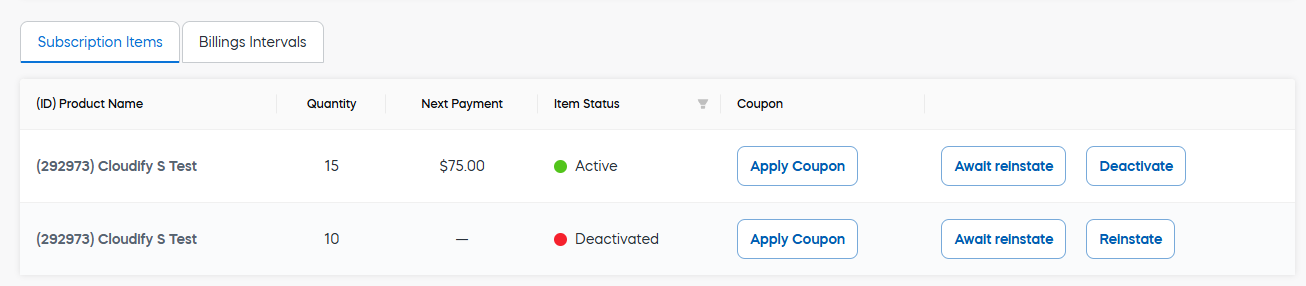
Subscription Item Statuses in the web admin tool
Implement API endpoints
Before you start
Make sure that:
- Each subscription item has the status
Active. - At least one subscription item remains active after the update.
NoteUse the Update Subscription Renewal Type endpoint instead when canceling a single-item subscription or the final active item in a multi-item subscription.
ImportantGet the customer's consent before making changes to a subscription.
To avoid chargebacks and customer inquiries, it is also essential that you coordinate all price increases with Client Experience.
In the European Economic Area (EEA), Strong Customer Authentication (SCA) is required for recurring electronic payments when the amount changes. This means that some of your customers will have to authenticate their payment, which in turn might impact the renewal success rate.
For more information, see Best Practices: Obtain Customer Consent.
Step 1: Retrieve the subscription details
Use the Get Subscription endpoint to retrieve the current subscription details and identify the active subscription items and their RunningNo values.
Parameters
| Parameter | Type | Required | Example | Notes |
|---|---|---|---|---|
| SubscriptionId | str | Yes | S67458907 | The unique identifier of the subscription. |
Request
curl --location 'https://rest.cleverbridge.com/subscription/getsubscription?subscriptionId=S67458907'
--header 'Accept: application/json'
--header 'Authorization: Basic YOUR_BASE64_ENCODED_CREDENTIALS'
import http.client
conn = http.client.HTTPSConnection("rest.cleverbridge.com")
payload = ''
headers = {
'Accept': 'application/json',
'Authorization': 'Basic YOUR_BASE64_ENCODED_CREDENTIALS'
}
conn.request("GET", "/subscription/getsubscription?subscriptionId=S67458907", payload, headers)
res = conn.getresponse()
data = res.read()
print(data.decode("utf-8"))var https = require('follow-redirects').https;
var options = {
'method': 'GET',
'hostname': 'rest.cleverbridge.com',
'path': '/subscription/getsubscription?subscriptionId=S67458907',
'headers': {
'Accept': 'application/json',
'Authorization': 'Basic YOUR_BASE64_ENCODED_CREDENTIALS'
},
'maxRedirects': 20
};
var req = https.request(options, function (res) {
var chunks = [];
res.on("data", function (chunk) {
chunks.push(chunk);
});
res.on("end", function (chunk) {
var body = Buffer.concat(chunks);
console.log(body.toString());
});
res.on("error", function (error) {
console.error(error);
});
});
req.end();Unirest.setTimeouts(0, 0);
HttpResponse<String> response = Unirest.get("https://rest.cleverbridge.com/subscription/getsubscription?subscriptionId=S67458907")
.header("Accept", "application/json")
.header("Authorization", "Basic YOUR_BASE64_ENCODED_CREDENTIALS")
.asString();Response
{
  "Subscription": {
    "Id": 67458907,
    "NextBillingDate": "2026-06-04T15:21:59.975915",
    "NextBillingCustomerGrossPrice": 125.0,
    "Items": [
      {
        "ProductName": "Cloudify S Test",
        "RunningNo": 1,
        "Quantity": 1,
        "Status": 1,
        "IsCurrent": true,
        "NextRenewalCustomerGrossPrice": 75.0
      },
      {
        "ProductName": "Cloudify S Test",
        "RunningNo": 2,
        "Quantity": 1,
        "Status": 1,
        "IsCurrent": true,
        "NextRenewalCustomerGrossPrice": 50.0
      }
    ]
  },
  "ResultMessage": "OK"
}
Step 2: Deactivate the subscription items
Use the Deactivate Subscription Items endpoint to deactivate the selected subscription items effective on the next billing date.
Parameters
| Parameter | Type | Required | Example | Notes |
|---|---|---|---|---|
| SubscriptionId | str | Yes | S67458907 | The unique identifier of the subscription. |
| Items | array[int] | Yes | [2] | The RunningNo values of the subscription items to deactivate, obtained from the Get Subscription response. |
| AllowReinstate | bool | No | true | Allows the customer to reinstate the deactivated item before the next billing date. |
Request
curl --location 'https://rest.cleverbridge.com/subscription/deactivatesubscriptionitems'
--header 'Content-Type: application/json'
--header 'Accept: application/json'
--header 'Authorization: Basic YOUR_BASE64_ENCODED_CREDENTIALS'
--data '{
  "Items": [
    2
  ],
  "SubscriptionId": "S67458907",
  "AllowReinstate": true
}'
import http.client
import json
conn = http.client.HTTPSConnection("rest.cleverbridge.com")
payload = json.dumps({
"Items": [
2
],
"SubscriptionId": "S67458907",
"AllowReinstate": True
})
headers = {
'Content-Type': 'application/json',
'Accept': 'application/json',
'Authorization': 'Basic YOUR_BASE64_ENCODED_CREDENTIALS'
}
conn.request("POST", "/subscription/deactivatesubscriptionitems", payload, headers)
res = conn.getresponse()
data = res.read()
print(data.decode("utf-8"))var https = require('follow-redirects').https;
var options = {
'method': 'POST',
'hostname': 'rest.cleverbridge.com',
'path': '/subscription/deactivatesubscriptionitems',
'headers': {
'Content-Type': 'application/json',
'Accept': 'application/json',
'Authorization': 'Basic YOUR_BASE64_ENCODED_CREDENTIALS'
},
'maxRedirects': 20
};
var req = https.request(options, function (res) {
var chunks = [];
res.on("data", function (chunk) {
chunks.push(chunk);
});
res.on("end", function (chunk) {
var body = Buffer.concat(chunks);
console.log(body.toString());
});
res.on("error", function (error) {
console.error(error);
});
});
var postData = JSON.stringify({
"Items": [
2
],
"SubscriptionId": "S67458907",
"AllowReinstate": true
});
req.write(postData);
req.end();Unirest.setTimeouts(0, 0);
HttpResponse<String> response = Unirest.post("https://rest.cleverbridge.com/subscription/deactivatesubscriptionitems")
.header("Content-Type", "application/json")
.header("Accept", "application/json")
.header("Authorization", "Basic YOUR_BASE64_ENCODED_CREDENTIALS")
.body("{\n \"Items\": [\n 2\n ],\n \"SubscriptionId\": \"S67458907\",\n \"AllowReinstate\": true\n}")
.asString();
Response
{
    "ResultMessage": "OK"
}
Diagram
flowchart LR
classDef mainColor fill:#ffffff,color:#555555,stroke:#96C34B,stroke-width:2px;
A([" <br/><b>Get subscription</b><br/>The application uses the <i>Get Subscription</i> endpoint to retrieve the customer's active seats. <br/> "]):::mainColor
--> B([" <br/><b>Deactivate an item</b><br/>The application uses the <i>Deactivate Subscription Items</i> endpoint. <br/> "]):::mainColor
--> C([" <br/><b>Billing</b><br/>Cleverbridge renews only the remaining active Cloudify S seat and bills the customer $75.00. <br/> "]):::mainColorUpdated 2 months ago