

Deactivate Subscription Items
Overview
This guide shows you how to implement the Deactivate Subscription Items endpoint to allow customers to cancel a subscription.
Use case
- A Cloudify customer has a subscription with multiple cloud storage add-ons.
- The customer logs in to the My Subscriptions page on the Cloudify website. The page uses the Get Subscriptions for Customer endpoint to retrieve the customer's active subscriptions and subscription items.
- The customer selects several subscription items they no longer want to renew and clicks Cancel Selected Items. The page uses the Deactivate Subscription Items endpoint to deactivate the selected subscription items.
Result
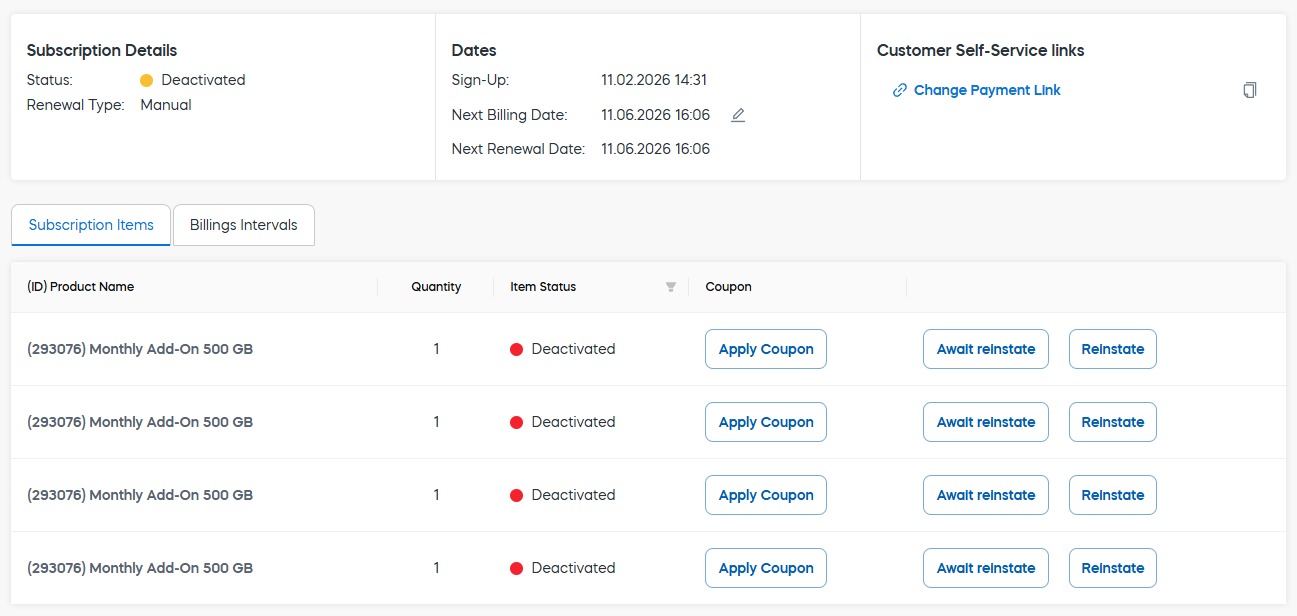
The selected subscription items are deactivated and are not renewed on the next billing date. Any remaining active subscription items continue to renew normally.
NoteFor full-subscription cancellation, or when the customer wants to cancel the only item or the last active item, offer a Turn off automatic renewal option instead of using the Deactivate Subscription Items endpoint.
The renewal-type switch is available only for subscriptions managed through Subscription Management 2.0.
For more information, see Turn Off Automatic Renewal.
Implement API endpoints
Before you start
Make sure that:
- The subscription has the status
Active. - Each selected subscription item has the status
Active. - At least one subscription item must remain active after the change. Do not use this endpoint to deactivate the only item or the last active item in a subscription.
- For Subscription Management 2.0 subscriptions, use the Update Subscription Renewal Type endpoint to turn off automatic renewal instead.
NoteThe Update Subscription Renewal Type endpoint is available only for subscriptions managed through Subscription Management 2.0.
For subscriptions not using Subscription Management 2.0, contact Cleverbridge Customer Support or implement an alternative cancellation process.
- You securely identify the customer before allowing subscription changes.
- You get the customer’s explicit consent before making subscription changes.
ImportantGet the customer’s explicit consent before making subscription changes.
For more information, see Best Practices: Obtain Customer Consent.
Step 1: Retrieve the customer's subscriptions
Use the Get Subscriptions for Customer endpoint to retrieve the customer's current subscriptions.
Parameters
| Parameter | Type | Required | Example | Notes |
|---|---|---|---|---|
| customerId | str | No | 123456789 | The unique identifier of the customer. |
| customerReferenceId | str | No | QzFGr7bIISqb7FdWP | Your internal customer identifier stored in Cleverbridge. |
| customerEmail | str | No | [email protected] | The customer's email address. |
| subscriptionstatus | str | No | Active | Filters subscriptions by status. |
| IsCurrent | bool | No | true | Set to true if you want to retrieve data only for items where IsCurrent is set to true. |
Pass exactly one of the following customer identifiers:
CustomerIdCustomerReferenceId- or
CustomerEmail.
Request
curl --location 'https://rest.cleverbridge.com/subscription/getsubscriptionsforcustomer?customerEmail=technicalcommunication%40cleverbridge.com&subscriptionstatus=Active'
--header 'Accept: application/json'
--header 'Authorization: Basic YOUR_BASE64_ENCODED_CREDENTIALS'
import http.client
conn = http.client.HTTPSConnection("rest.cleverbridge.com")
payload = ''
headers = {
'Accept': 'application/json',
'Authorization': 'Basic YOUR_BASE64_ENCODED_CREDENTIALS'
}
conn.request("GET", "/subscription/getsubscriptionsforcustomer?customerEmail=technicalcommunication@cleverbridge.com&subscriptionstatus=Active", payload, headers)
res = conn.getresponse()
data = res.read()
print(data.decode("utf-8"))var request = require('request');
var options = {
'method': 'GET',
'url': 'https://rest.cleverbridge.com/subscription/getsubscriptionsforcustomer?customerEmail=technicalcommunication@cleverbridge.com&subscriptionstatus=Active',
'headers': {
'Accept': 'application/json',
'Authorization': 'Basic YOUR_BASE64_ENCODED_CREDENTIALS'
}
};
request(options, function (error, response) {
if (error) throw new Error(error);
console.log(response.body);
});
Unirest.setTimeouts(0, 0);
HttpResponse<String> response = Unirest.get("https://rest.cleverbridge.com/subscription/getsubscriptionsforcustomer?customerEmail=technicalcommunication%40cleverbridge.com&subscriptionstatus=Active")
  .header("Accept", "application/json")
  .header("Authorization", "Basic YOUR_BASE64_ENCODED_CREDENTIALS")
  .asString();
Response
{
  "Subscriptions": [
    {
      "Id": 67560422,
      "Subscriptionstatus": 1,
      "RenewalType": "Automatic",
      "NextBillingDate": "2026-06-11T14:06:59.147775",
      "Items": [
        {
          "RunningNo": 1,
          "ProductName": "Monthly Add-On 500 GB",
          "Quantity": 1,
          "Status": 1,
          "NextRenewalCustomerGrossPrice": 10.0
        },
        {
          "RunningNo": 2,
          "ProductName": "Monthly Add-On 500 GB",
          "Quantity": 1,
          "Status": 2,
          "DeactivationDate": "2026-05-18T15:52:31.835556"
        },
        {
          "RunningNo": 3,
          "ProductName": "Monthly Add-On 500 GB",
          "Quantity": 1,
          "Status": 2,
          "DeactivationDate": "2026-05-18T15:55:39.744041"
        },
        {
          "RunningNo": 4,
          "ProductName": "Monthly Add-On 500 GB",
          "Quantity": 1,
          "Status": 1,
          "NextRenewalCustomerGrossPrice": 10.0
        }
      ]
    },
    {
      "Id": 67458907,
      "Subscriptionstatus": 1,
      "RenewalType": "Automatic",
      "NextBillingDate": "2026-06-04T15:21:59.975915",
      "Items": [
        {
          "RunningNo": 1,
          "ProductName": "Cloudify Base Usage",
          "Quantity": 1,
          "Status": 1
        },
        {
          "RunningNo": 2,
          "ProductName": "Cloudify S Test",
          "Quantity": 15,
          "Status": 1,
          "NextRenewalCustomerGrossPrice": 75.0
        },
        {
          "RunningNo": 2,
          "ProductName": "Cloudify S Test",
          "Quantity": 10,
          "Status": 2,
          "DeactivationDate": "2026-05-22T09:04:43.884147"
        }
      ]
    }
  ],
  "ResultMessage": "OK"
}
Subscription item statuses
Status Meaning 1 Active 2 Deactivated
Step 2: Deactivate the subscription item
Use the Deactivate Subscription Items endpoint to deactivate the subscription item.
Parameters
| Parameter | Type | Required | Example | Notes |
|---|---|---|---|---|
| SubscriptionId | str | Yes | S67560422 | The unique identifier of the subscription. |
| Items | array of integers | Yes | "Items": [1,2,3,4] | The running number of the subscription item to deactivate. |
Request
curl --location 'https://rest.cleverbridge.com/subscription/deactivatesubscriptionitems?SubscriptionId=S67203942&RunningNumber=1'
--header 'Content-Type: application/json'
--header 'Accept: application/json'
--header 'Authorization: Basic YOUR_BASE64_ENCODED_CREDENTIALS'
--data '{
  "Items": [
    1,
    2,
    3,
    4
  ],
  "SubscriptionId": "S67560422",
  "AllowReinstate": true

}'
import http.client
import json
conn = http.client.HTTPSConnection("rest.cleverbridge.com")
payload = json.dumps({
"Items": [
1,
2,
3,
4
],
"SubscriptionId": "S67560422",
"AllowReinstate": True
})
headers = {
'Content-Type': 'application/json',
'Accept': 'application/json',
'Authorization': 'Basic YOUR_BASE64_ENCODED_CREDENTIALS'
}
conn.request("POST", "/subscription/deactivatesubscriptionitems?SubscriptionId=S67203942&RunningNumber=1", payload, headers)
res = conn.getresponse()
data = res.read()
print(data.decode("utf-8"))var https = require('follow-redirects').https;
var fs = require('fs');
var options = {
'method': 'POST',
'hostname': 'rest.cleverbridge.com',
'path': '/subscription/deactivatesubscriptionitems?SubscriptionId=S67203942&RunningNumber=1',
'headers': {
'Content-Type': 'application/json',
'Accept': 'application/json',
'Authorization': 'Basic YOUR_BASE64_ENCODED_CREDENTIALS'
},
'maxRedirects': 20
};
var req = https.request(options, function (res) {
var chunks = [];
res.on("data", function (chunk) {
chunks.push(chunk);
});
res.on("end", function (chunk) {
var body = Buffer.concat(chunks);
console.log(body.toString());
});
res.on("error", function (error) {
console.error(error);
});
});
var postData = JSON.stringify({
"Items": [
1,
2,
3,
4
],
"SubscriptionId": "S67560422",
"AllowReinstate": true
});
req.write(postData);
req.end();Unirest.setTimeouts(0, 0);
HttpResponse<String> response = Unirest.post("https://rest.cleverbridge.com/subscription/deactivatesubscriptionitems?SubscriptionId=S67203942&RunningNumber=1")
.header("Content-Type", "application/json")
.header("Accept", "application/json")
.header("Authorization", "Basic YOUR_BASE64_ENCODED_CREDENTIALS")
.body("{\n \"Items\": [\n 1,\n 2,\n 3,\n 4\n ],\n \"SubscriptionId\": \"S67560422\",\n \"AllowReinstate\": true\n\n}")
.asString();
Response
{
    "ResultMessage": "OK"
}
Diagram
flowchart LR
classDef mainColor fill:#ffffff,color:#555555,stroke:#96C34B,stroke-width:2px;
A([" <br/><b>Retrieve subscriptions</b><br/>The <i>Get Subscriptions for Customer</i> endpoint retrieves the customer’s active subscription items <br/> "]):::mainColor
--> B([" <br/><b>Customer selects items</b><br/>The customer selects the subscription items they no longer need <br/> "]):::mainColor
--> C([" <br/><b>Deactivation</b><br/>The <i>Deactivate Subscription Items</i> endpoint is used <br/> "]):::mainColor
Updated 2 months ago